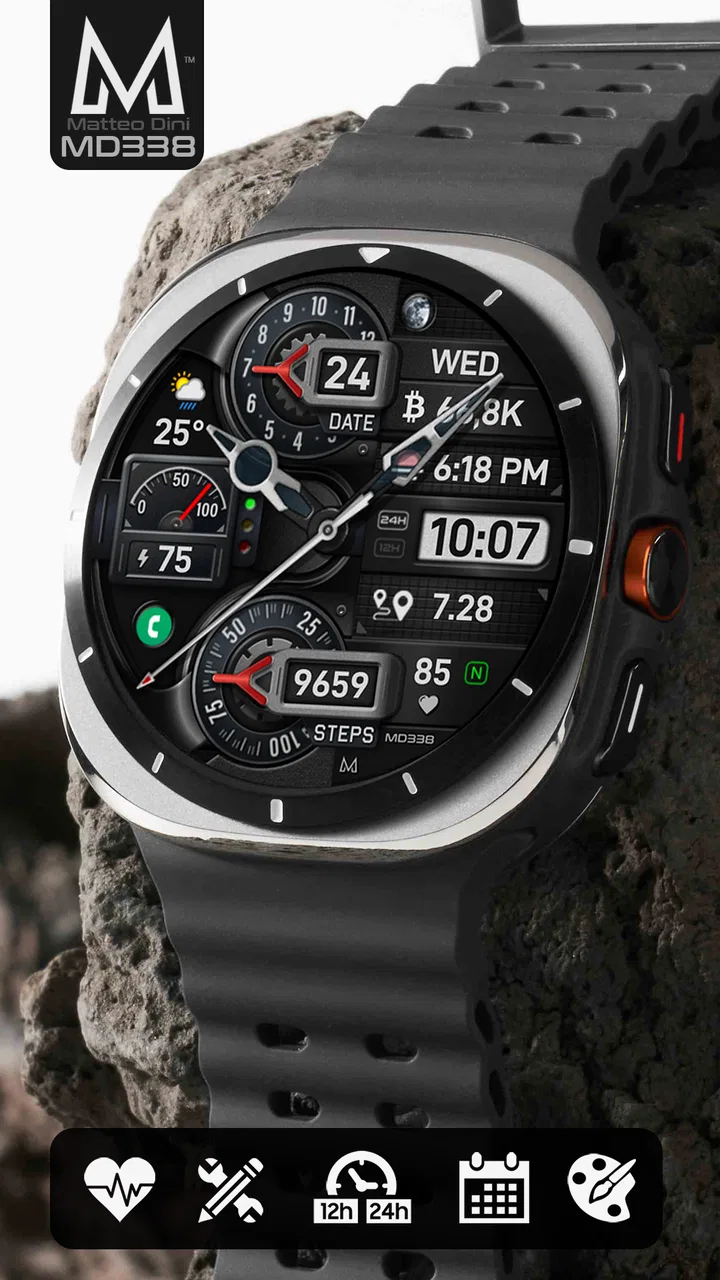
MD338 Hybrid watch face
- 4.6
- Rating
- 10.00K
- Installs
- $1.99
- Price
 Analysis by App-foxy
I approached MD338 Hybrid as the kind of Wear OS watch face you choose when the default design feels too plain, but a flashy replacement would be inconvenient every day. Its appeal is easy to understand: it combines an analog-style clock with digital information and gives personalization a central role. After spending time with it, I see it less as a decorative download and more as a practical front door to the information I check repeatedly throughout the day.
The app is made by Matteo Dini MD ® Watch Faces and sits in the personalization category. It costs $1.99, carries an Everyone age rating, and has built a 4.6 average from around 500 ratings, with more than 10K installs. Those figures suggest a watch-face audience that is actively looking for a more tailored Wear OS experience rather than simply accepting whatever comes preinstalled.
From a plain watch screen to a daily setup
The starting condition is familiar. I want my watch to show the time clearly, but I also want the screen to feel like mine. A standard Wear OS face may be perfectly readable, yet it often makes me choose between a traditional clock appearance and useful digital details. MD338 Hybrid addresses that tension by putting both styles into one layout.
You May Also Like

 Blood Strike: 2.5 Anniversary
Blood Strike’s Loadouts Turn Every Drop Into a Tactical Gamble
A close look at Blood Strike’s custom loadouts: how fast access to signature weapons reshapes its battle royale rhythm, rewards preparation, and narrows the gap between fights.

 Pandora - Music & Podcasts
Pandora’s Music Is Easy to Start, but Harder to Recover
Pandora’s strength is its low-effort path from a seed to a station. Its weak spot is how much confidence it asks you to place in connection, setup, and quiet recovery.

 8 Ball Pool
8 Ball Pool Is Built on Rivalries, Rematches, and Routine
A close look at the rivalries, rematches, shared routines, and unanswered safety questions that turn a quick pool match into a persistent mobile community.

 Samsung Music
Samsung Music’s Quiet Strength Is Playing What You Already Own
Its reach comes less from spectacle than from dependable access to a personal library. That simplicity is both the app’s strongest retention engine and its ceiling.

 AccuWeather: Weather Radar
AccuWeather Review: A Quick, Clear Forecast for Everyday Decisions
For everyday plans, the best forecast is the one you can understand quickly. AccuWeather makes rain timing, radar, and local conditions easy to act on, with a few trade-offs.

 Hill Climb Racing
Why Hill Climb Racing Still Turns Crashes Into One More Run
A tiny car, a bumpy hill and one more upgrade: Hill Climb Racing keeps resurfacing because its simple chaos makes every near-miss feel personal.
More From Our News Desk
View All News


The first thing I notice is that the hybrid approach changes how the watch feels on the wrist. Analog hands provide an immediate sense of the current time, while digital elements make exact reading quicker when I am walking, sitting in a meeting, or checking the watch for only a second. That combination is more useful than it sounds. I do not always want to interpret hands, but I also do not always want a screen that looks like a tiny dashboard.
Its strongest audience is someone who wants a watch face that can move between work, errands, and casual use without looking out of place. The design is more purposeful than a purely ornamental face, but it still gives enough room for personal choices. I would recommend it to people who enjoy adjusting their watch until the information hierarchy feels right, not to someone who wants to install a face and never touch a setting again.
The price also affects the decision. At $1.99, this is inexpensive enough to consider as a focused customization purchase, but it is not automatically the best choice for someone who changes watch faces constantly and prefers to try everything at no cost. I think of it as buying one dependable layout rather than collecting a large library of experiments.
Choosing the right starting layout
My advice is to begin with the information you actually check, rather than with colors or decorative details. If you mainly glance at the time and date, keep the face visually calm. If you use the watch during a busy day, prioritize the areas that reduce the need to open another screen. The useful question is not “How much can I customize?” but “What should I understand in one glance?”
This matters because a hybrid face can become crowded when every available area is treated as equally important. The analog center should remain the visual anchor. Digital information works best when it supports that anchor instead of competing with it. I found that a restrained configuration is easier to read outdoors, during movement, and when the wrist is only briefly raised.
A less obvious advantage is that customization can be used to create different visual priorities for different routines. A work setup can emphasize quick time reading and a clean appearance, while a weekend setup can be more expressive. The practical trade-off is that switching between carefully arranged choices takes more effort than relying on a fixed default face. That is the cost of having control.
The setup flow, one decision at a time
The workflow begins with installing the watch face and applying it to a compatible Wear OS watch. From there, I treat the configuration screen as a design exercise rather than a checklist. I look at how the face behaves at a glance, then adjust one element at a time. Changing several things together makes it difficult to tell which choice improved or weakened the result.
I start with the overall appearance, because readability depends on the relationship between the hands, background, and digital areas. Once that feels comfortable, I move to the information choices. This order is important: selecting useful details first can lead to a face that is technically informative but visually tiring. Establishing the clock’s main identity before filling secondary areas produces a more balanced result.
After each change, I check the watch from the distance at which I normally read it. A configuration that looks excellent in a close-up preview may feel dense when viewed during a quick glance. I also check both bright and dim surroundings. A watch face is not just a static image; it has to survive changes in attention, lighting, and viewing angle.
The best setup is the one that reduces decisions during the day. I would rather have a smaller amount of information that I can recognize instantly than a full collection of details that forces me to search the screen. This is where MD338 Hybrid feels more useful than a decorative analog face, while remaining less overwhelming than a highly technical digital dashboard.
Making the customization work for real routines
Consider a realistic weekday. I leave home in the morning, glance at my wrist while carrying a bag, check the time between tasks, and look again before heading into an appointment. In that situation, the face has three jobs: show the time immediately, remain legible without careful positioning, and avoid making me open the watch’s app screen for information I expect to see at a glance.
For that routine, I would keep the central clock visually dominant and use only the supporting information I genuinely consult. The handoff from setup to daily use is successful when the watch stops feeling like a project. Once the layout is tuned, I should not be thinking about the face; I should simply be able to read it.
Another useful scenario is travel within a familiar city. I may not need a specialized travel face, but I do want a stable, readable time display while moving between transport, shops, and meetings. A hybrid design works well here because the analog presentation gives the watch a conventional feel, while the digital component makes exact time confirmation faster.
For fitness-focused users, the situation is different. A dedicated activity-oriented face may be a better choice if workout metrics are the main reason for looking at the watch. MD338 Hybrid is better suited to general daily wear than to a session where every glance is about performance data. That distinction is important: customization does not turn a general-purpose face into a specialist tool.
The handoff between phone, watch, and attention
A watch-face purchase is not finished when the app is installed. There is a handoff between the phone’s configuration experience and the watch’s small display, and this is where many customization products become frustrating. Settings are easier to understand on a larger screen, but the final test happens on the wrist. I therefore judge the result by what survives that transition.
MD338 Hybrid makes sense when the phone is used as a preparation space and the watch becomes the finished product. I can make deliberate choices during setup, then evaluate them in the context where they matter. The important habit is to return to the watch after every meaningful adjustment instead of trusting a preview alone.
There is also a handoff from the watch face to the rest of Wear OS. A face can show a useful entry point, but tapping through to a separate function still depends on the watch’s normal behavior. I would not choose this face expecting it to replace dedicated apps or provide a complete information system by itself. Its role is to make the first glance more useful and more personal.
This separation helps clarify expectations. The face handles presentation; the wider operating system handles deeper interactions. That is a sensible arrangement, but it means users who want extensive on-face interaction may prefer a more specialized alternative. MD338 Hybrid is strongest when the watch face is treated as a clear starting screen, not as the entire smartwatch experience.
What the finished result feels like
Once configured thoughtfully, the result is a watch that feels more intentional than the default Wear OS presentation. The analog and digital elements serve different reading habits without forcing me to choose one permanently. I can read the hands in a traditional way or use the digital information when speed matters.
The face also has a useful middle ground in its personality. It is not so minimal that it feels empty, and it is not so busy that it resembles a control panel. That balance is the main reason I would recommend it. Someone who wants a recognizable everyday face can keep it restrained, while someone who enjoys personalization can spend more time refining the appearance.
The developer’s focus on watch faces is relevant here. Matteo Dini MD ® Watch Faces is not being presented as a general-purpose productivity developer; the product is clearly centered on the visual and practical experience of Wear OS. That specialization shows in the way the face is designed around repeated glances rather than long sessions.
I also appreciate that the purchase is easy to understand. The app is an app rather than a game, and its Everyone rating makes it suitable for a broad audience. The value comes from the watch face itself, not from a complicated learning curve. Still, the amount of control means the first setup can take longer than applying a basic built-in face.
Where the workflow breaks down
The main friction is the same feature that makes the face attractive: customization. More choice creates more opportunities to make a poor arrangement. If I add too much information or select weak contrasts, the result becomes harder to read. Users who dislike adjusting small visual details may find the process less rewarding than the final product suggests.
There is also a practical limit to what a small watch display can communicate. A hybrid layout can combine styles, but it cannot make every item equally prominent. If I want a face dedicated to health, exercise, weather, or rapid access to several separate tools, another option may be more appropriate. MD338 Hybrid should not be judged as a replacement for every specialized watch face.
Another trade-off concerns consistency. A design that looks excellent on one watch model or in one lighting condition may need personal adjustment in another context. I would spend time checking the actual device rather than assuming that a preview represents every situation. This is not a criticism unique to this face, but it matters more when the product’s appeal depends on fine visual balance.
People who want a completely free experience should also pause before buying. The cost is modest, but the right question is whether this particular hybrid style will remain on the wrist. If I enjoy rotating through faces every day, a single paid design may have less value. If I want one adaptable face for regular use, the purchase is easier to justify.
Who should choose it, and who should pass
I think MD338 Hybrid is a strong match for Wear OS owners who want an everyday face with both traditional and digital time reading. It suits someone who likes personalization, values a quick glance, and wants a design that can be adjusted for different settings without becoming a novelty item.
It is also a good choice for users who are moving away from a default face but do not want an extreme visual change. The hybrid format provides a familiar clock foundation, which makes the transition comfortable. In my experience, that is more useful than choosing a dramatic design that looks exciting for a day but becomes tiring after a week.
I would skip it if my priority were maximum simplicity, a dedicated fitness display, or a face that requires no configuration at all. A basic built-in option may be better for someone who wants zero setup. A specialist face may be better for someone whose watch is primarily a workout or data-monitoring device. The right choice depends on whether flexibility or immediacy matters more.
My recommendation after using the full workflow
MD338 Hybrid succeeds because it treats the watch face as part of a daily routine rather than as a static decoration. The journey from installation to final result involves a few deliberate choices, and those choices matter: preserve a clear visual anchor, select only information that earns its space, and test the finished layout during ordinary movement and changing light.
Its weaknesses are manageable but real. The customization can invite clutter, and the hybrid format will not satisfy people seeking a highly specialized data screen. I would also avoid recommending it blindly to someone who never changes settings or who prefers to try many free alternatives before paying.
For my own use, the balance is convincing. The face gives me the traditional presence of an analog watch while making exact reading more convenient, and it leaves enough room to adapt the appearance to different parts of the day. At $1.99, I consider it a sensible purchase for anyone who wants one polished, flexible Wear OS face rather than an endless collection. If that describes you, MD338 Hybrid is worth considering as a practical personalization upgrade, not merely as another screen to download.
FAQs for MD338 Hybrid watch face
01What is MD338 Hybrid watch face?
MD338 Hybrid is a customizable watch face designed for compatible Wear OS smartwatches. It combines an analog-style dial with digital information, giving the display a traditional appearance while still showing practical data at a glance. Depending on the installed version and supported device, it may include elements such as time, date, battery status, steps, heart rate, and shortcut areas.
02Which smartwatches are compatible with MD338 Hybrid?
Compatibility depends on the version of Wear OS supported by your smartwatch and the requirements listed on the Google Play Store. It is generally intended for Wear OS devices, but not every watch model or older operating system version is guaranteed to work. Before downloading, check the store listing and confirm that your specific watch appears among the supported devices.
03Can I customize the appearance and information shown?
MD338 Hybrid is intended to offer more than a fixed clock design, with customization options that can vary according to the watch and the edition installed. Users may be able to change colors, complications, shortcuts, or displayed data. Some options can be configured directly through the Wear OS companion app, while others may require tapping and holding the watch face.
04Does MD338 Hybrid watch face affect battery life?
As with any third-party watch face, battery consumption can vary depending on the display technology, brightness, animations, complications, and update frequency. A simple configuration usually has a smaller effect, while continuously updated health or activity information may use more power. If battery life becomes a concern, reduce active complications and disable features you do not regularly need.
05Does the watch face require permissions or an internet connection?
The basic time display should not normally require a permanent internet connection, although installation and updates need access to the relevant app store. Optional functions, such as steps, heart rate, weather, or other complications, may request permissions from Wear OS or their associated applications. Review each permission carefully and allow only the data access needed for the features you plan to use.
Pros
- Clear hybrid layout combines analog hands with an easy-to-read digital display.
- Includes useful glanceable data such as date
- battery
- and activity information.
- Modern
- sporty styling works well for both casual and active outfits.
- Designed for Wear OS with optimized use of the watch’s round screen.
- Multiple color and display options allow some personalization.
Cons
- Some advanced features may require compatible Wear OS hardware.
- The information-dense design can feel crowded on smaller watch screens.
- Customization options may be more limited than in fully configurable faces.
- Always-on display elements can increase battery consumption.
- Installation and setup may be less intuitive for first-time users.

MD338 Hybrid watch face
Gallery